


Description
PayClock Online gives you more flexibility and freedom to focus on the heart of your business - selling product and services to your customers. Now you have the ability to manage employee time and attendance from any location and at anytime, for fast and easy payroll processing.
All you need is a web browser and an Internet connection. With all the functionality of Lathem's desktop PayClock® software, PayClock Online now lets you capture, edit and export your workforce time & attendance data into your payroll systems such as ADP, QuickBooks, Paychex etc. when it is convenient and from anywhere, at anytime.
Easily set up your employees to clock in and out with Lathem automated time clocks. For employees that work out of the office you have the option to track their time remotely using web enabled devices like Smart phones. All your employees can view their own historical time card information and benefit time via any Internet connected device, whenever they want and without having to go a manager.
Export Data To:
| Quickbooks Desktop 2009+ (Any Version) | Quickbooks Online | |||
| ADP Workforce Now (PC Payroll) | ADP RUN | |||
| ASCII Export | Complete Payroll | |||
| Evolution | Fortune 1000 (ACOMBA) | |||
| Heartland Plus One | LTC Payroll | |||
| Millennium | Paychex Flex | |||
| Paychex Flex V2 | Paychex Paylink for Windows | |||
| Preview by Paychex | Paychoice | |||
| Payroll 1 | Payroll Based Journal | |||
| PayWork Payroll | Rapid Payroll | |||
| Sage 50 US – Time Ticket Register | Sage BusinessWorks 2013 | |||
| Summit Payroll | SurePayroll |
How It Works with Quickbooks:
Any time clock that works with Quickbooks will function basically the same way. Quickbooks itself does not actually talk to any time clocks, which means we need to have a piece of software in between to act as the middleman. In this case it would be Payclock Online. The employees punch at the time clock and those punches flow back into Payclock Online, into each employees virtual time card. The administrators will login to Payclock Online and review the employees time cards for errors & missing punches, and add in any non work time, such as Sick, Vacation, Holiday, and more. Once the administrator is satisfied with each employees time card and it is time to process payroll, they will click an Export Data button that creates a file in the format Quickbooks is looking for, and pushes the data into Quickbooks. Each type of hours and the number of hours the employee had in that period will automatically be placed into their paycheck in the Quickbooks Payroll module. No more adding up time sheets, rounding time manually, or entering time by hand. Payclock Online will do all of that for you.
This is the same basic process for any of the exports listed above.
See How Payclock Online Stacks Up. See our Software Comparison Chart
Clock Options:
Payclock Online lets you use a number of different time clock types, web browser punching, or smartphone punching on iOS and Android devices, making it one of the most flexible options out there for small businesses. A physical time clock is not required to use Payclock Online, take advantage of the hardware your business already has using the web punching function or smartphone punching with GPS tracking. If you would like to use Payclock Online without a time clock sign up at the link below.
Clocks that work with Payclock Online:


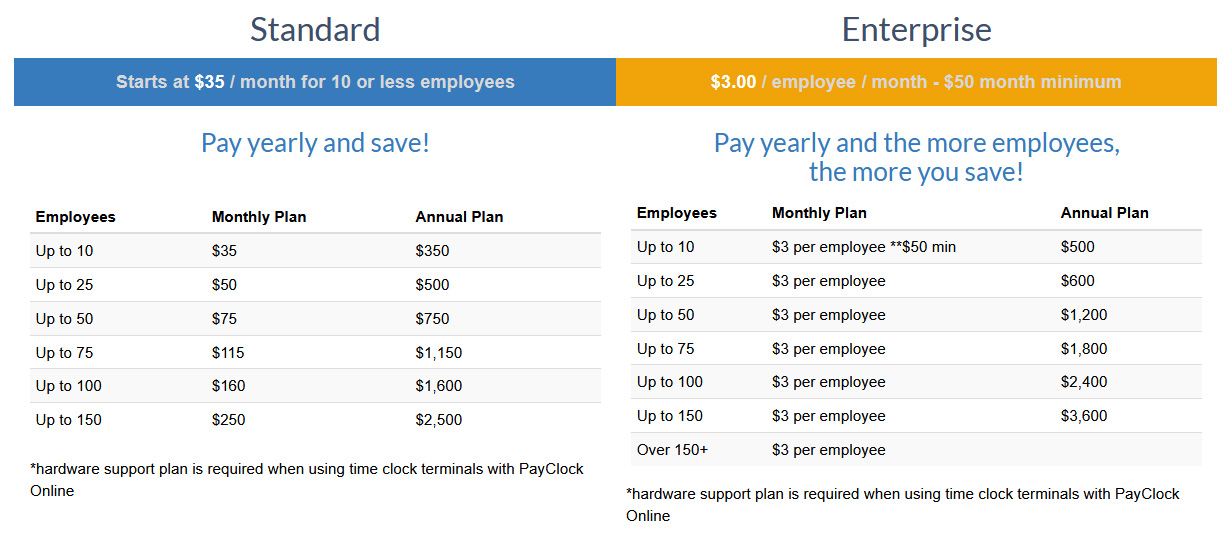
Software Plans & Pricing:

Watch Our Payclock Video Demo:
Check out Payclock Online's Mobile App for iPhone & Android:
Get your 15 day Free Trial of Payclock Online:
No Credit Card Required
Additional Information
Number of Employees: |
Unlimited in the Software, but clocks may have limited numbers of templates or badge numbers they can handle. |
Accepts Badges: |
This Software can work with multiple clocks, the clocks that accept badges are: PC600, CT70 & CT72 |
Accepts Fingerprints: |
This Software can work with multiple clocks, the clock that accepts fingerprints is: CT72 |
Accepts Pin Entry: |
This Software can work with multiple clocks, the clocks that accept Pin Entry are: PC600, CT72 & CT70 |
Wifi Enabled: |
This Software can work with multiple clocks, the clocks that are Wifi Enabled are: CT70 & CT72 |
Displays Employee Hours: |
This Software can work with multiple clocks, the clocks that display employee hours are: PC600, CT70 & CT72 |
Monthly Fee: |
Yes (Fee is based on the number of employees active in the system) |
Mobile Apps: |
Yes - iOS & Android |
Desktop Punching: |
Yes with Internet Browser |
Works with Quickbooks Desktop: |
Yes - Any Version |
Works with Quickbooks Online: |
Yes |


